The Odoo upgrade guide question used to be optional a “maybe next year” item. In 2026 it isn’t. Odoo now charges a 25% annual surcharge on older “legacy” versions, which means staying put can cost you real money for zero added value. At the same time, Odoo ships a major new version every October, so the gap between an old release and the latest keeps widening. If you’re on Odoo 17, 18, or weighing a move to 19, this guide gives you the clarity to decide: what’s changed, what staying costs, and whether an upgrade is worth it for your business.
Let’s cut through the version noise and make the Odoo upgrade guide for decision a clear-eyed business call rather than a guess.
The 2026 Reality: Why This Decision Changed?
The single biggest shift is financial. Odoo’s founder announced that any version outside the three most recently released versions now attracts an additional 25% annual fee on the Enterprise subscription. As of 2026, the three covered versions are Odoo 17, 18, and 19 — everything from Odoo 16 downward is classed as “Legacy.”
Crucially, legacy versions still receive official support — but at a premium. Odoo isn’t cutting anyone off; it’s simply making it expensive to stay behind. The surcharge applies from April 2026, so businesses that upgraded before that point avoided it for the cycle. Consider a 50-user company on an old version with a $30,000 annual subscription: the 25% surcharge adds $7,500 a year — three years of delay is $22,500 in pure penalty, buying no new features and no competitive advantage.
Watch-out: The surcharge stacks with other 2026 changes — Odoo raised subscription prices in some regions and added an annual price-indexation clause to new and renewed contracts. Staying on legacy is getting pricier from multiple directions at once.
Odoo Version Timeline at a Glance
Odoo releases a major version every October. Here’s where each one stands in 2026:
| Version | Released | Status in 2026 |
|---|---|---|
| Odoo 16 & earlier | 2022 or before | Legacy — 25% surcharge applies |
| Odoo 17 | Oct 2023 | Covered (oldest supported) |
| Odoo 18 | Oct 2024 | Covered — stable, widely adopted |
| Odoo 19 | Oct 2025 | Latest — newest features & AI |
Each version receives roughly three years inside the “covered” window before it slips into legacy territory — which is exactly why a planned upgrade cadence matters.
What’s New: Odoo 17 vs 18 vs 19
Each release built on the last. Here’s how they compare across the areas that matter most:
| Area | Odoo 17 | Odoo 18 | Odoo 19 |
|---|---|---|---|
| Main focus | Usability & UI redesign | Refined UX, connected modules | AI, performance, ESG |
| Interface | Drag-and-drop apps, better search | Lighter, more intuitive | Further refined |
| Automation | Rule-based | Rule-based, improved | AI-powered, predictive insights |
| Standout feature | Streamlined navigation | Multilingual website builder | Dedicated AI section, ESG reporting |
| Security | Standard | Standard | Stronger (mandatory MFA) |
In short: Odoo 17 was about usability, Odoo 18 polished and connected the experience, and Odoo 19 is the AI-and-performance leap — introducing platform-wide AI, predictive analysis, ESG reporting, and stronger security as standard.
Should You Upgrade? A Quick Decision Framework
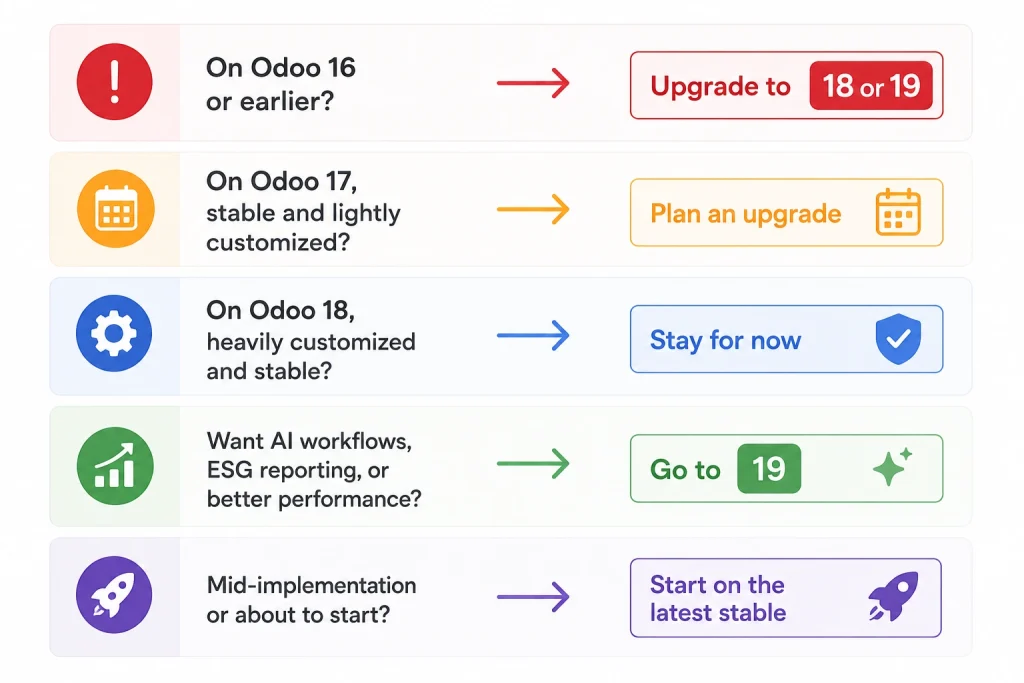
The right answer depends on where you are today. Use this as a guide:
- On Odoo 16 or earlier? Upgrade is effectively non-negotiable — you’re paying the 25% penalty and missing security updates. Move to 18 or 19.
- On Odoo 17, stable and lightly customized? Plan an upgrade within the next cycle to stay ahead of the legacy line.
- On Odoo 18, heavily customized and stable? You can comfortably stay for now; move to 19 when the AI and performance gains justify the effort.
- Want AI workflows, ESG reporting, or better performance? Odoo 19 is the clear destination.
- Mid-implementation or about to start? Go straight to the latest stable version for maximum runway.
Pro tip: Don’t chase the newest version for its own sake. Upgrade when the benefits (features, security, avoiding the surcharge) outweigh the migration effort — not because a new number shipped.
The Real Cost of Staying Put
Delaying feels free, but it rarely is. Beyond the 25% legacy surcharge, an aging version means missing security hardening (like Odoo 19’s mandatory MFA), foregoing automation that cuts labor, and falling behind on compliance-relevant features. Worse, the longer you wait, the bigger the eventual jump — upgrading across several versions at once is far riskier and more expensive than a steady, planned cadence. The “we’ll deal with it later” approach quietly converts a manageable project into a major one.
For how this ties into ongoing costs, see our guide to Odoo support, maintenance, and AMC plans.
What an Odoo Upgrade Guide Actually Involves?
An upgrade isn’t just clicking “update.” A proper project follows a clear path:
- Audit your current version, customizations, third-party apps, and integrations to find what needs adapting.
- Prepare a test (staging) environment and migrate a copy of your database.
- Adapt custom modules and integrations to the new version’s framework.
- Test every critical workflow and report against real scenarios.
- Train users on what’s changed in the interface and features.
- Go live on the upgraded version with a short hypercare period.
The heavier your customization, the more important the audit and testing phases become. We handled exactly this kind of work in our database consolidation and upgrade case study.
Pro Tips for a Smooth Upgrade
- Always test in staging first. Never upgrade a live production database directly.
- Review your customizations honestly. Some custom code may now be standard — drop what you no longer need.
- Upgrade on a cadence. Treat the yearly release as a scheduled event, not a surprise.
- Document everything. Clear documentation makes every future upgrade faster and cheaper.
- Use an experienced partner. Version migrations are where undocumented quirks surface — expertise pays off.
Odoo Upgrade Decision by the Numbers
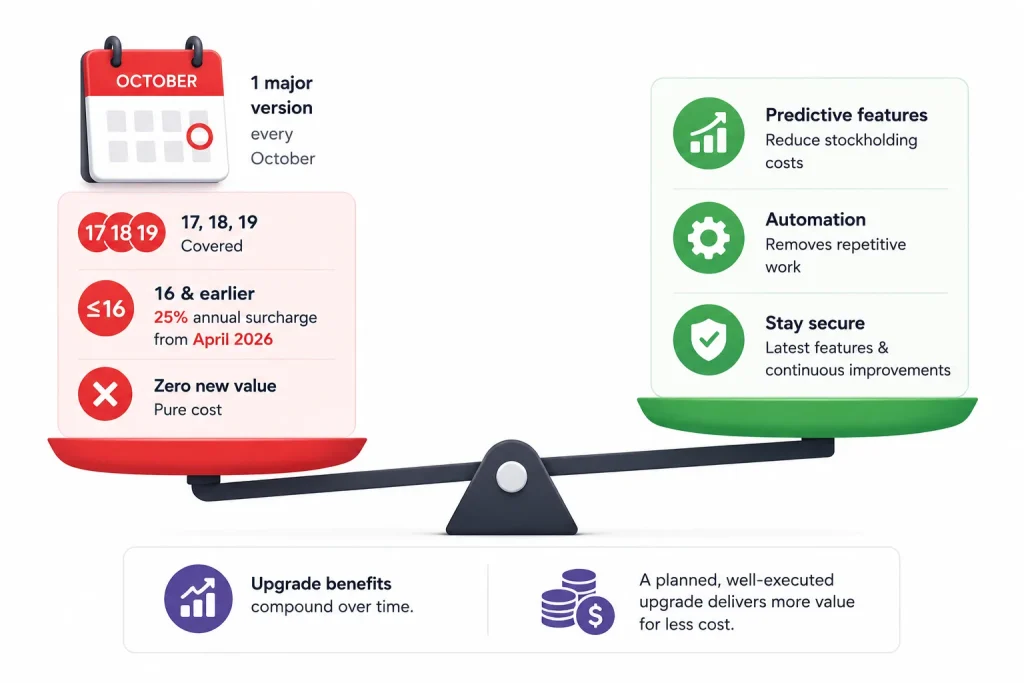
The figures that should shape your decision: Odoo ships one major version every October; the three most recent versions (17, 18, 19) are covered, while 16 and earlier incur a 25% annual surcharge from April 2026; and that surcharge delivers zero new value — it’s pure cost. Meanwhile, upgrade benefits compound: Odoo 19’s predictive features can trim stockholding costs and its automation removes repetitive work.
Weighed against a planned, well-executed upgrade, staying on legacy is the more expensive path. For the broader investment view, see our Odoo ROI guide.
Common Questions, Answered Fast
1. Should I upgrade from Odoo 17 to 18 or 19?
If you want maximum runway and the latest AI, performance, and security features, go to 19. If you prefer a smaller jump on a proven release, 18 is a solid, stable choice. Both keep you clear of the legacy surcharge.
2. What is the Odoo 25% legacy surcharge?
It’s an extra 25% annual fee on the Enterprise subscription for versions older than the three most recent releases (currently anything below Odoo 17), applied from April 2026. Legacy versions still get support, but at a premium.
3. Is Odoo 19 worth upgrading to?
For businesses wanting AI-powered workflows, ESG reporting, stronger security, and better performance, yes. If your Odoo 18 system is stable and heavily customized, you can plan the move for when those gains justify the effort.
4. Will upgrading break my customizations?
It can, which is why an audit and staging test are essential. Custom modules and integrations often need adapting to the new version’s framework before go-live.
5. How often does Odoo release new versions?
Once a year, every October. Planning your upgrade cadence around this keeps you within the covered window and avoids the legacy penalty.
Make the Right Upgrade Call
The Odoo upgrade decision in 2026 comes down to a simple trade-off: the cost and effort of upgrading versus the rising cost of standing still. For most businesses on legacy versions, the math now clearly favors moving. We assess your version, customizations, and integrations, then plan and execute a clean, low-risk upgrade. Explore our methodology and client success stories.
Book a free Odoo upgrade assessment — we’ll tell you exactly where you stand and map the smartest path to a supported version.